An official FBI document dated January 2021, obtained by the American association “Property of People” through the Freedom of Information Act.
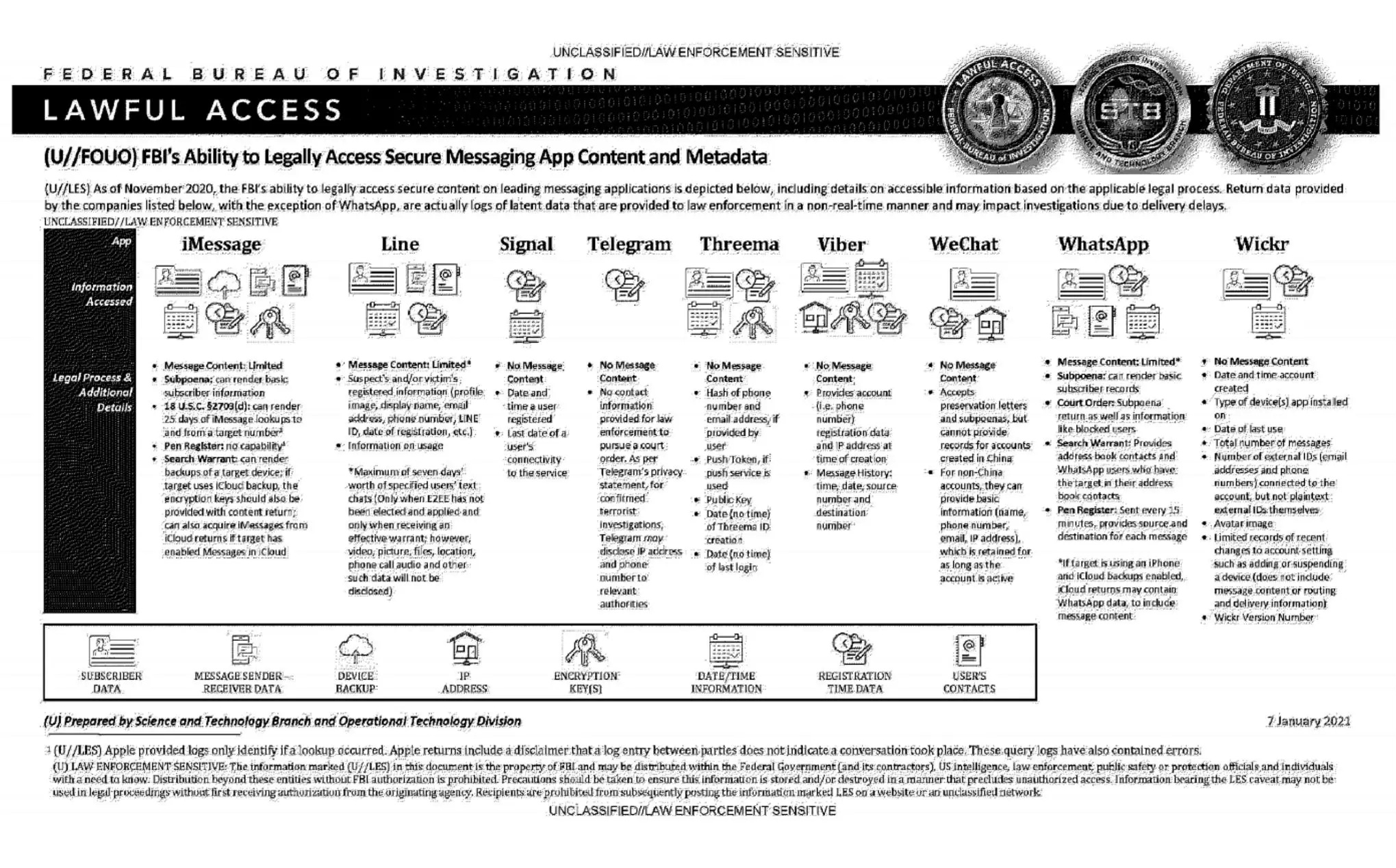
This document summarizes the possibilities for legal access to data from nine instant messaging services: iMessage, Line, Signal, Telegram, Threema, Viber, WeChat, WhatsApp and Wickr. For each software, different judicial methods are explored, such as subpoena, search warrant, active collection of communications metadata (“Pen Register”) or connection data retention law (“18 USC§2703”). Here, in essence, is the information the FBI says it can retrieve:
Apple iMessage: basic subscriber data; in the case of an iPhone user, investigators may be able to get their hands on message content if the user uses iCloud to synchronize iMessage messages or to back up data on their phone.
Line: account data (image, username, e-mail address, phone number, Line ID, creation date, usage data, etc.); if the user has not activated end-to-end encryption, investigators can retrieve the texts of exchanges over a seven-day period, but not other data (audio, video, images, location).
Signal: date and time of account creation and date of last connection.
Telegram: IP address and phone number for investigations into confirmed terrorists, otherwise nothing.
Threema: cryptographic fingerprint of phone number and e-mail address, push service tokens if used, public key, account creation date, last connection date.
Viber: account data and IP address used to create the account; investigators can also access message history (date, time, source, destination).
WeChat: basic data such as name, phone number, e-mail and IP address, but only for non-Chinese users.
WhatsApp: the targeted person’s basic data, address book and contacts who have the targeted person in their address book; it is possible to collect message metadata in real time (“Pen Register”); message content can be retrieved via iCloud backups.
Wickr: Date and time of account creation, types of terminal on which the application is installed, date of last connection, number of messages exchanged, external identifiers associated with the account (e-mail addresses, telephone numbers), avatar image, data linked to adding or deleting.
TL;DR Signal is the messaging system that provides the least information to investigators.
↳
In-reply-to
»
QOTD: How do you back up your files?
⤋ Read More
@movq@www.uninformativ.de I clone the important stuff on two separate clusters, but both are in my house. One of these days I’m planning to ask my brother to put a server of mine in his house, and then we can cross-clone for offsite backups that don’t require the cloud.
↳
In-reply-to
»
QOTD: How do you back up your files?
⤋ Read More
Follow-up question for you guys: Where do you backup your files to? Anything besides the local NAS?
↳
In-reply-to
»
QOTD: How do you back up your files?
⤋ Read More
@mckinley@twtxt.net ninja backup and Borg
↳
In-reply-to
»
Rebooting a LUKS Encrypted System Without Typing The Passphrase: https://mckinley.cc/blog/20230526.html
⤋ Read More
@mckinley@twtxt.net Yeah, that’s more clear. 👌
Systems that are on all the time don’t benefit as much from at-rest encryption, anyway.
Right, especially not if it’s “cloud storage”. 😅 (We’re only doing it on our backup servers, which are “real” hardware.)
My backup power for internet and raspis is good for a couple hours.
I accidentally wiped out my bookmarks file this afternoon. Syncthing propagated the change, and I was forced to restore from an old partial backup. Lesson learned: versioning is useful.
restic · Backups done right! – In case no-one has used this wonderful tool restic yet, I can beyond a doubt assure you it is really quite fantastic 👌 #backups
He creado un sencillo script en bash para hacer backup de mi envs, works like a charm.
He creado un sencillo script en bash para hacer backup de mi envs, works like a charm.
The battery life in this i9 MacBook Pro from 2018 has diminished to being barely enough to serve as an UPS backup system with enough time to perform a safe shutdown
mostly for the purpose of offline / async posting, not so much as a backup microblogs are not very important in an archival sense, its more about the transient moment
Getting started with Restic for my backup needs. It’s really neat and fast.
New repository: aquilax/imrepository - Instant Messaging Backup Tool