I really think I should go back to Java.
Writing programs in Python is so exhausting. I want a compiler and I want static typing. No, linters and type checkers and IDEs are not good enough. Compilers catch way more errors in advance.
Rust is also exhausting. They’re constantly adding language features and, at the same time, the runtime library remains tiny and you need 3rd party libraries for everything. Many of those are still at version 0.x (SemVer!) and you can’t rely on anything. Often times, you need the latest Rust nightly compiler.
Go is … I don’t like it. And huge binaries.
I like C as a language, but it’s too fragile. I want to have a proper HashMap every now and then.
None of the above have good GUI libraries, at least not on Linux.
And then there’s Java. This is my fractal renderer that I wrote over 17 years ago:
https://movq.de/v/fcd3c4e557/vid-1784121825.mp4
It’s fast. It has a GUI with custom widgets and those weren’t even hard to make. It still works without changing a single line of code. The source code files have timestamps from 2009 and I just noticed that the JAR file I’m using in the video was compiled in 2010.
Java as a language is relatively easy to learn and to master. There are few surprises. The source code organization with packages is good. Java API docs are clear and well written.
The JVM ramp-up times have improved considerably:
https://movq.de/v/e7314e521e/vid-1784121998.mp4
This isn’t like the Dark Ages anymore. Might even be usable for some CLI tools.
The only thing where Java really sucks is anything close-ish to the kernel. Try issuing an ioctl() … I couldn’t have made my TUI framework in Java, but then again, I wouldn’t have needed to because Swing already exists and it just works.
Making progress on NovaTerm TUI browser. I almost abandoned this. Glad I didn’t
Making progress on Waystone Comm TUI browser. Had to change the name and I almost abandoned this. Glad I didn’t
It’s 2026 and I am troubleshooting ZMODEM issues with a TUI.. Who would have thunk it? :)
I noticed that there are quite a few UI glitches in vim-classic – and quickly found the cause: It comes with outdated Unicode tables.
I have to admit that I wasn’t aware that there’s a new Unicode release every year:
https://en.wikipedia.org/wiki/Unicode#Versions
Look at this huge number of changes. Every program has to keep track of that, often through libraries but sometimes not (like in Vim’s case).
I use Unicode extensively, but this shit is extremely expensive …
My TUI framework is having the same problem. At the moment, this is all offloaded to wcwidth, but if that library was to become unmaintained, I’d have to track Unicode myself.
Gah!
The DOS days were simpler. CP437, end of story. (Yes, I know that’s a lie.)
These commit messages… https://github.com/vergonha/garden-tui
@movq@www.uninformativ.de Regarding https://movq.de/blog/postings/2026-06-16/0/POSTING-en.html:
In my opinion, the KDE 3.5 menu was organized way better than the Windows Start menu. Granted, a typical KDE installation had much more applications to offer, too. So, there was more need to get it right. And it probably was also later in time.
Isn’t Notepad++ and Python cheating!? :-D
Crazy story on the clock’s seconds. I never heard of that before. Neat.
Yeah, UI these days is horrible. (That’s why my own TUIs suck, too!)
↳
In-reply-to
»
Every now and then, I think that I have carefully proof-read my message enough times and hit the "Add message" button in
⤋ Read More
tt. But then, in the message tree, I spot another missed typo. My process is then to go to my twtxt.txt and fix it by hand. However, I still have to clean up tt's cache. This is rather tidious:
With multicolored TUIs, I find it usually hard to immediately tell which button is selected if there are just two.
Indeed, I wouldn’t be able to tell in that example, either. movwin works around that by (mostly) assuming that there is no support for colors at all, so there should always be a way to tell which widget has focus, even without colors. That’s why it puts brackets around a button’s label when focused:


The fewer colors you use, the better, I guess. 🤔
↳
In-reply-to
»
Every now and then, I think that I have carefully proof-read my message enough times and hit the "Add message" button in
⤋ Read More
tt. But then, in the message tree, I spot another missed typo. My process is then to go to my twtxt.txt and fix it by hand. However, I still have to clean up tt's cache. This is rather tidious:
Another thing: With multicolored TUIs, I find it usually hard to immediately tell which button is selected if there are just two. I’m asking people for any relevant information. :-)
↳
In-reply-to
»
Every now and then, I think that I have carefully proof-read my message enough times and hit the "Add message" button in
⤋ Read More
tt. But then, in the message tree, I spot another missed typo. My process is then to go to my twtxt.txt and fix it by hand. However, I still have to clean up tt's cache. This is rather tidious:
Getting the vim key bindings to work for focus switching in this modal dialog took me forever. Only cursors and (Shift+)Tab are supported out of the box. I absolutely understand that, it’s fine. I installed an input handler on the dialog, but the focus always stayed the same.
After two wasted hours, I was in despair to copy the tview.Modal into my own code base. Of course, I had to fix all the private tview field accesses first. But even installing the input handler directly on the buttons themselves did not work. Even though, the handler was definitely executed, the focus did not shift. Forcing redraws as a last resort also did not work.
Looking through all the messy chained input handling, I eventually stumbled across another place in the tview.Form, which is internally used by tview.Modal. This messed around with app focus receptions and input handlers. This gave me the idea to make the tview.Application refocus my modal dialog after I told the modal dialog which button to select. And would you look at that, this did the trick! I haven’t completely figured out what is going on exactly, but I could get rid of my Modal clone again.
I always go through hell with focus handling in tview. Each and every time. It just does not feel natural to me. Complete brainfuck to wrap my head around. The Urwid API felt sooo much more refined, it never was an issue. It just works. In fact, I cannot think of any other TUI library that has remotely the same pain level when it comes to focusing widgets as tview.
Now I’m curious how movwin deals with that. ;-)
↳
In-reply-to
»
First draft of a file selection popup / widget:
⤋ Read More
@movq@www.uninformativ.de That is really cool! Maybe it would look nicer if the selected entry highlighted the whole row, not just the individual cells in that row without the column spacers. :-? But maybe I’m wrong. Everyone has their own taste.
And no, it’s not pointless at all. I find this really interesting. The videos and photos are perfect for me. Even if I had the source code, I would not use that toolkit, as I’m not a fan of movable windows in TUIs. I want all my own programs to be fullscreen all the time. 8-) Having said that, it’s still an absolutely brilliant source of inspriation that will come in handy one day. So, keep posting. :-)
I’m still having some fundamental design issues with my TUI widget system, so I’m still not comfortable making this code public.
But after a day of work (and discussing AI ad nauseam at work), I just don’t have any energy left. 😑
↳
In-reply-to
»
👋 Looking for other interested folks to continue to evolve the development of Salty.im 🙏 I've been hard™ at work on the
⤋ Read More
v2 branch and @doesnm.p.psf.lt has been incredibly helpful so far. Be great ot have a few more folks to join us, some of the v2 highlights include:
@bender@twtxt.net Here is a properly formatted version of your message:
Not yet — but that’s probably a good idea.
Instructions:
- Clone the repository
git clone https://git.mills.io/saltyim/saltyim.git
cd saltyim
- Check out the
v2branch
git checkout v2
- Build and install the CLI/TUI
make DESTDIR=$HOME/bin install
After installation, run:
salty-chat
👋 Looking for other interested folks to continue to evolve the development of Salty.im 🙏 I’ve been hard™ at work on the v2 branch and @doesnm.p.psf.lt@doesnm.p.psf.lt has been incredibly helpful so far. Be great ot have a few more folks to join us, some of the v2 highlights include:
- Double Ratchet by default.
- Group Chat (sender/client fan-out for now)
- Much better TUI with background agent.
- Mobile App coming soon™ (iOS in progress, Android next, same codebase)
I spent the day today integrating @xuu@txt.sour.is’s double ratcheting work and ratchet library back into the reference client/broker implementation saltyim as a v2 branch. I completely redesigned and rewrite the salty-chat TUI client as well, which now includes proper notifications and a background agent that keeps running so you never miss any messages. It all “just works”™ and I’m quite happy with the outcome! 🤩 #saltyim #revamp
I have been trying out the TUI email client named aerc. (pronounced ark) I like it a lot!
↳
In-reply-to
»
@lyse Ah, the lower right corner is different on purpose: It’s where you can click and drag to resize the window. https://movq.de/v/cbfc575ca6/vid-1767977198.mp4 Not sure how to make this easier to recognize. 🤔 (It’s the only corner where you can drag, btw.)
⤋ Read More
@lyse@lyse.isobeef.org It’s not super comfortable, that’s right.
But these mouse events come with a caveat anyway:
ncurses uses the XM terminfo entry to enable mouse events, but it looks like this entry does not enable motion events for most terminal emulators. Reporting motion events is supported by, say, XTerm, xiate, st, or urxvt, it just isn’t activated by XM. This makes all this dragging stuff useless.
For the moment, I edited the terminfo entry for my terminal to include motion events. That can’t be a proper solution. I’m not sure yet if I’m supposed to send the appropriate sequence manually …
And the terminfo entries for tmux or screen don’t include XM at all. tmux itself supports the mouse, but I’m not sure yet how to make it pass on the events to the programs running inside of it (maybe that’s just not supported).
To make things worse, on the Linux VT (outside of X11 or Wayland), the whole thing works differently: You have to use good old gpm to get mouse events (gpm has been around forever, I already used this on SuSE Linux). ncurses does support this, but this is a build flag and Arch Linux doesn’t set this flag. So, at the moment, I’m running a custom build of ncurses as a quick hack. 😅 And this doesn’t report motion events either! Just clicks. (I don’t know if gpm itself can report motion events, I never used the library directly.)
tl;dr: The whole thing will probably be “keyboard first” and then the mouse stuff is a gimmick on top. As much as I’d like to, this isn’t going to be like TUI applications on DOS. I’ll use “Windows” for popups or a multi-window view (with the “WindowManager” being a tiny little tiling WM).
i know yarn has a CLI client in yarnc but ngl i wish there was a TUI client. that’d be really fun
twtxt_tui app! https://github.com/dev1lsconf/twtxt_tui #app #python #twtxt
twtxt tui - como va quedando??? 
twtxt tui - como va quedando???
probando mi nuevo tui para twtxt :P
↳
In-reply-to
»
When will the flat UI craze end? Can I get my buttons, scrollbars, and toolbars back, please?
⤋ Read More
@movq@www.uninformativ.de Yeah, most of the graphical applications are actually KDE programs:
- KMail – e-mail client
- Okular – PDF viewer
- Gwenview – image viewer
- Dolphin – file browser
- KWallet – password manager (I want to check out
passone day. The most annoying thing is that when I copy a password, it says that the password has been modified and asks me whether I want to save the changes. I never do, because the password is still the same. I don’t get it.)
- KPatience – card game
- Kdenlive – video editor
- Kleopatra – certificate manager
Qt:
- VLC – video player
- Psi – Jabber client (I happily used Kopete in the past, but that is not supported anymore or so. I don’t remember.)
- sqlitebrowser – SQLite browser
Gtk:
- Firefox – web browser
- Quod Libet – music player (I should look for a better alternative. Can’t remember why I had to move away from Amarok, was it dead? There was a fork Clementine or so, but I had to drop that for some unknown reason, too.)
- Audacity – audio editor
- GIMP – image editor
These are the things that are open right now or that I could think of. Most other stuff I actually do in the terminal.
In the past™, I used the Python KDE4 bindings. That was really nice. I could pass most stuff directly in the constructor and didn’t have to call gazillions of setters improving the experience significantly. If I ever wanted to do GUI programming again, I’d definitely go that route. There are also great Qt bindings for Python if one wanted to avoid the KDE stuff on top. The vast majority I do for myself, though, is either CLI or maybe TUI. A few web shit things, but no GUIs anymore. :-)
there should be a yarn posting TUI. tbh
i love everything pico.sh i wish i had more of a use for their services but the paste service is SUPER handy omg i finally had a reason to use it (to send a friend my unfinished failed marvel API bash program lol) and it’s epic. i love SSH i love TUI apps they are the best
↳
In-reply-to
»
twtxt is a decentralised, minimalist microblogging service for hackers.
⤋ Read More
I’d need to think about it deeply, but at a first sight, nanoblogging would be a simple text (like the original twtxt spec, aimed for TUIs), and microblogging (like Twitter was a few years ago), would be about sharing texts, images, videos, GIFs, links, and perhaps Markdown styling.
Why? You have shorter messages than in a blog, but you may add almost anything you could do in a blog.
Buuut… who knows?
↳
In-reply-to
»
Any idea What's this
⤋ Read More
"twtxtfeevalidator/0.0.1" UA about? I thought I could ask before throwing a 1000GB file at it 🪤 could it be the same 'xt' thing @lyse was talking about the other day?
@lyse@lyse.isobeef.org yep, I gave it a spin locally! I freaking love the cute logo and the UI is fiiiine 👌 my TUI browsers love it just as much …

↳
In-reply-to
»
Okay, this is pretty cool. My 8086 toy OS running on my old Pentium from an actual floppy disk. 😍 I just love that sound and the feeling of using floppies. This brings back so many memories from my early DOS days.
⤋ Read More
@movq@www.uninformativ.de Implementing my own TUI rendering in the tt rewrite, I know what a headache this can be. :-)
↳
In-reply-to
»
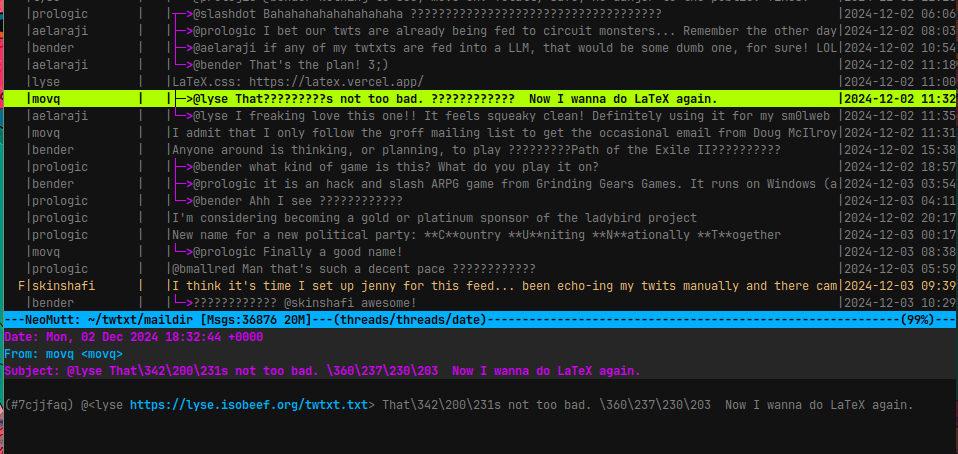
I think it's time I set up jenny for this feed... been echo-ing my twits manually and there came times when it made me feel like a dork xD Plus I don't have my vim's
⤋ Read More
:set spell to catch up with the typos
Done! but then again, there’s something weired going on with my muttrc-jenny config file xD … I’m seeing a bunch of ????s in the TUI’s subjects section… checking a couple of twt’s headers I see somethings like \360\237\230\261 (escapesd unicode?), sometime that shows in the mail body and sometimes not.
Could it have something to do with the remote/pubnix machin’s Locale or something? one more thing to digg through 🫠
↳
In-reply-to
»
I’ve been using Mastodon too much lately. The constant notifications are becoming too stressful. I really do prefer slow communication, like twtxt. ✌️
⤋ Read More
@bender@twtxt.net Well, so far, I’m using the standard web client. Haven’t found a great client yet. 🫤 Mastodon/Fediverse is also very different from twtxt, there are way more images/videos that I’d like to see – a TUI client like toot wouldn’t work for me.
Dunno, maybe I’ll make some changes in this area after christmas. Try self-hosting again or something like that …
↳
In-reply-to
»
Thanks @lyse! I'm replying here https://text.eapl.mx/reply-to-lyse-about-twtxt
⤋ Read More
Thank you, @eapl.me@eapl.me! No need to apologize in the introduction, all good. :-)
Section 3: I’m a bit on the fence regarding documenting the HTTP caching headers. It’s a very general HTTP thing, so there is nothing special about them for twtxt. No need for the Twtxt Specification to actually redo it. But on the other hand, a short hint could certainly help client developers and feed authors. Maybe it’s thanks to my distro’s Ngninx maintainer, but I did not configure anything for the Last-Modified and ETag headers to be included in the response, the web server just already did it automatically.
The more that I think about it while typing this reply, the more I think your recommendation suggestion is actually really great. It will definitely beneficial for client developers. In almost all client implementation cases I’d say one has to actually do something specifically in the code to send the If-Modified-Since and/or If-None-Match request headers. There is no magic that will do it automatically, as one has to combine data from the last response with the new request.
But I also came across feeds that serve zero response headers that make caching possible at all. So, an explicit recommendation enables feed authors to check their server setups. Yeah, let’s absolutely do this! :-)
Regarding section 4 about feed discovery: Yeah, non-HTTP transport protocols are an issue as they do not have User-Agent headers. How exactly do you envision the discovery_url to work, though? I wouldn’t limit the transports to HTTP(S) in the Twtxt Specification, though. It’s up to the client to decide which protocols it wants to support.
Since I currently rely on buckket’s twtxt client to fetch the feeds, I can only follow http(s):// (and file://) feeds. But in tt2 I will certainly add some gopher:// and gemini:// at some point in time.
Some time ago, @movq@www.uninformativ.de found out that some Gopher/Gemini users prefer to just get an e-mail from people following them: https://twtxt.net/twt/dikni6q So, it might not even be something to be solved as there is no problem in the first place.
Section 5 on protocol support: You’re right, announcing the different transports in the url metadata would certainly help. :-)
Section 7 on emojis: Your idea of TUI/CLI avatars is really intriguing I have to say. Maybe I will pick this up in tt2 some day. :-)
↳
In-reply-to
»
@prologic @movq this is the default behavior of
⤋ Read More
pass on my machine:
@abucci@anthony.buc.ci So.. The issue is that its showing the password by default? Would making an alias to always include the -c help? We can probably engage Jason with a PR to enable a more hardened approach when desired. I’ve spoken to him before and is generally a pretty open to ideas.
I found this app that was created by the gopass author that does copy by default and has a tui or GUI mode https://github.com/cortex/ripasso