Well, it sure has been a while since I last posted here. Just up late doing yet another Linux installation. Debian turned out to be about as stable as a plutonium Jenga tower, and Alpine refused to boot, so I gave it the boot. Here’s to hoping that Arch fares better. Oddly, I’ve always found Arch to be considerably more stable than other distros…
⭐ Excellent petit éditeur de texte multi-plateforme (Linux, Mac, […] 🔗 https://yom.li/notes/20251008110810 🔖 https://micro-editor.github.io/
Today, I experimented with Linux Capabilities as a continuation to my Unix Domain Sockets research from a few months ago: https://lyse.isobeef.org/caller-information-via-unix-domain-sockets/#capabilities
I learned that I don’t know hardly anything and there is heaps more to explore. Tomorrow, I will do the same in Go and see how that feels.
All good things come to an end, I guess.
I have an Epson printer (AcuLaser C1100) and an Epson scanner (Perfection V10), both of which I bought about 20 years ago. The hardware still works perfectly fine.
Until recently, Epson still provided Linux drivers for them. That is pretty cool! I noticed today that they have relaunched their driver website – and now I can’t find any Linux drivers for that hardware anymore. Just doesn’t list it (it does list some drivers for Windows 7, for example).
I mean, okay, we’re talking about 20 years here. That is a very long time, much more than I expected. But if it still works, why not keep using it?
Some years ago, I started archiving these drivers locally, because I anticipated that they might vanish at some point. So I can still use my hardware for now (even if I had to reinstall my PC for some reason). It might get hacky at some point in the future, though.
This once more underlines the importance of FOSS drivers for your hardware. I sadly didn’t pay attention to that 20 years ago.
Just installed zsh and oh-my-zsh on my alpine linux vps
↳
In-reply-to
»
Task for this weekend:
⤋ Read More
@prologic@twtxt.net No, this is a Linux manpage from the man-pages project: https://git.kernel.org/pub/scm/docs/man-pages/man-pages.git/tree/man/man7/ascii.7
I do have an idea what’s going on. Could be an unfortunate interaction between the table preprocessor tbl and the man macro package. 🤔
↳
In-reply-to
»
@bender Really? 🤔
⤋ Read More
@zvava@twtxt.net Going to have to hard disagree here I’m sorry. a) no-one reads the raw/plain twtxt.txt files, the only time you do is to debug something, or have a stick beak at the comments which most clients will strip out and ignore and b) I’m sorry you’ve completely lost me! I’m old enough to pre-date before Linux became popular, so I’m not sure what UNIX principles you think are being broken or violated by having a Twt Subject (Subject) whose contents is a cryptographic content-addressable hash of the “thing”™ you’re replying to and forming a chain of other replies (a thread).
I’m sorry, but the simplest thing to do is to make the smallest number of changes to the Spec as possible and all agree on a “Magic Date” for which our clients use the modified function(s).
Gemini-PDA-Linux-Scripts https://github.com/matthewbaggett/Gemini-PDA-Linux-Scripts
↳
In-reply-to
»
Next level poop: Can’t log in to reddit anymore with adblock enabled. It says invalid usename or password.
⤋ Read More
Hmm, not experiencing that. Using Zen (Firefox), under Linux, with uBlock Origin.
Reverse Engineering of the Lockbit Linux ESXi Variant https://hackandcheese.com/posts/blog1_lockbit/
Aegis Authenticator and Linux Authenticator ?~L~X https://thenewleafjournal.com/b/852
What kind of client for linux do I need?
Is that really necessary? How hard is it to make a 32-bit build? 🤔 Honest question. https://blog.mozilla.org/futurereleases/2025/09/05/firefox-32-bit-linux-support-to-end-in-2026/
↳
In-reply-to
»
@lyse I'm looking for an OS that runs better than Windows (🤮) and through which I can do basic stuff like read RSS feeds and browse geminispace; but which I can also learn from.
⤋ Read More
@dce@hashnix.club Apart from the crap produced in Redmond two decades ago, I only ever used and still happily use Linux, mainly Debian and Ubuntu. I’ve no idea, but maybe something in there catches your eye: https://en.wikipedia.org/wiki/List_of_operating_systems (I know, what a silly recommendation.)
I have a late-2010s ThinkPad running OpenBSD, but it’s about as fast as a snail carrying heavy shopping through molasses. I’d like to run something other than Linux, for variety, but the other members of the BSD family failed for various reasons. What OS do you guys think I should try?
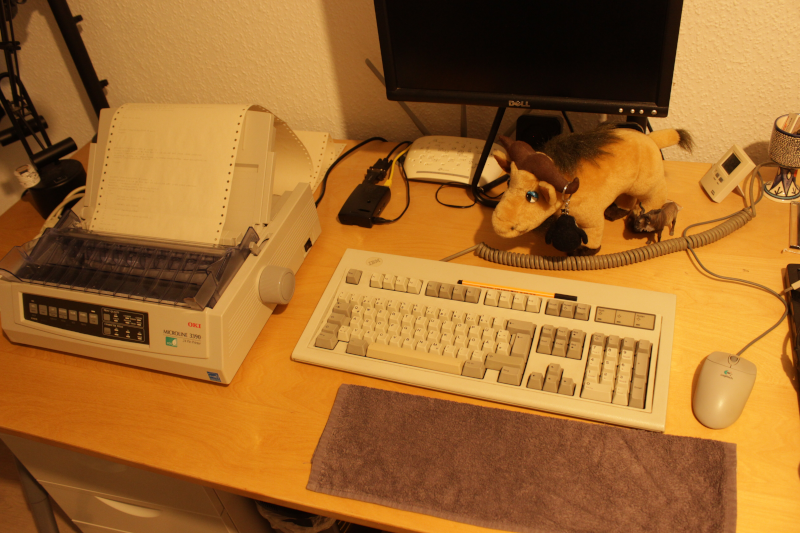
I’ve got a prototype of my hardcopy simulator going. I’m typing on the keyboard and the “display” goes to the printer:
https://movq.de/v/235c1eabac/MVI_8810.MOV.mp4
The biiiiiiiiiig problem is that the print head and plastic cover make it impossible to see what’s currently being printed, because this is not a typewriter. This means: In order to see what I just entered, I have to feed the paper back and forth and back and forth … it’s not ideal.
I got that idea of moving back/forth from Drew DeVault, who – as it turned out – did something similar a few years back. (I tried hard to read as little as possible of his blog post, because figuring things out myself is more fun. But that could mean I missed a great idea here or there.)
But hey, at least this is running on my Pentium 133 on SuSE Linux 6.4, printer connected with a parallel cable. 😍
(Also, yes, you can see the printouts of earlier tests and, yes, I used ed(1) wrong at one point. 🤪 And ls insisted on using colors …)
twtxting from Linux Mint uiiiiiiii! finally ~completely kiked windows #linux
↳
In-reply-to
»
i'm helping someone get a reverse proxy going on windows and my god this operating system is dogshit
⤋ Read More
@kat@yarn.girlonthemoon.xyz yeah it’s pretty terrible these days. Most recent trouble I had was something as simple as installing and setting up the Tailscale client. On literally all my other devices (Linux and Android) that was a cinch, but on Windows…. ohh boy, I had to mess around with reg edits and all sorts of crap and eventually bludgeoned it into working, but it was a bloody pain.
Distrobox is pretty handy and kind of amazed I haven’t played with it before now. I wanted to quickly try out Proton’s Authenticator they just released, but they only had binaries for Ubuntu and Fedora (naturally), but I’m on Void Linux on this laptop.
Installed the latest basic Fedora image with Distrobox, used dnf to install the downloaded rpm file within it, and presto, running the app within Void like I’d just downloaded it though the normal repos.
↳
In-reply-to
»
@lyse @kat Colorized manpages have been a thing for a very long time:
⤋ Read More
(Just for fun, SuSE Linux 6.4 from ~25 years ago: 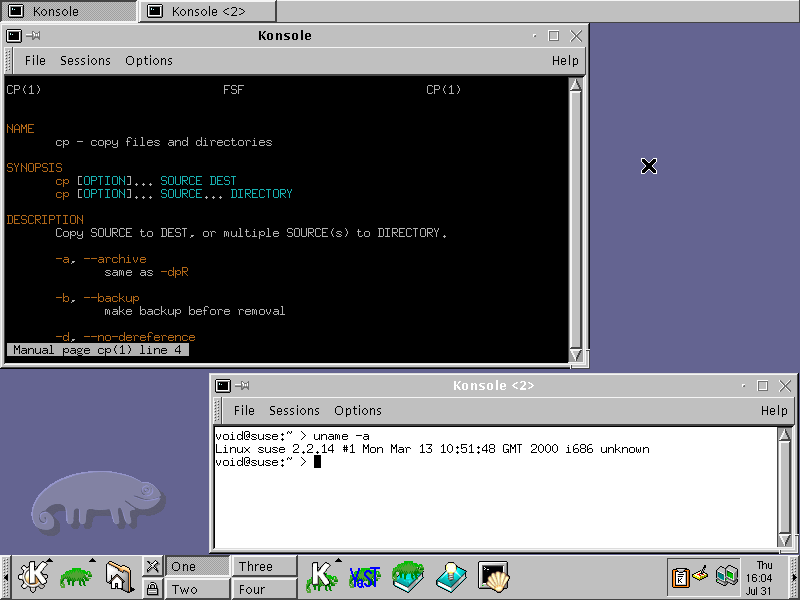 )
)
In 1996, they came up with the X11 “SECURITY” extension:
https://www.reddit.com/r/linux/comments/4w548u/what_is_up_with_the_x11_security_extension/
This is what could have (eventually) solved the security issues that we’re currently seeing with X11. Those issues are cited as one of the reasons for switching to Wayland.
That extension never took off. The person on reddit wonders why – I think it’s simple: Containers and sandboxes weren’t a thing in 1996. It hardly mattered if X11 was “insecure”. If you could run an X11 client, you probably already had access to the machine and could just do all kinds of other nasty things.
Today, sandboxing is a thing. Today, this matters.
I’ve heard so many times that “X11 is beyond fixable, it’s hopeless.” I don’t believe that. I believe that these problems are solveable with X11 and some devs have said “yeah, we could have kept working on it”. It’s that people don’t want to do it:
Why not extend the X server?
Because for the first time we have a realistic chance of not having to do that.
https://wayland.freedesktop.org/faq.html
I’m not in a position to judge the devs. Maybe the X.Org code really is so bad that you want to run away, screaming in horror. I don’t know.
But all this was a choice. I don’t buy the argument that we never would have gotten rid of things like core fonts.
All the toolkits and programs had to be ported to Wayland. A huge, still unfinished effort. If that was an acceptable thing to do, then it would have been acceptable to make an “X12” that keeps all the good things about X11, remains compatible where feasible, eliminates the problems, and requires some clients to be adjusted. (You could have still made “X11X12” like “XWayland” for actual legacy programs.)
The Death of Windows XP and My First Linux Netbook ?~L~X https://thenewleafjournal.com/b/7z2
↳
In-reply-to
»
I was drafting support for showing “application icons” in my window manager, i.e. the Firefox icon in the titlebar:
⤋ Read More
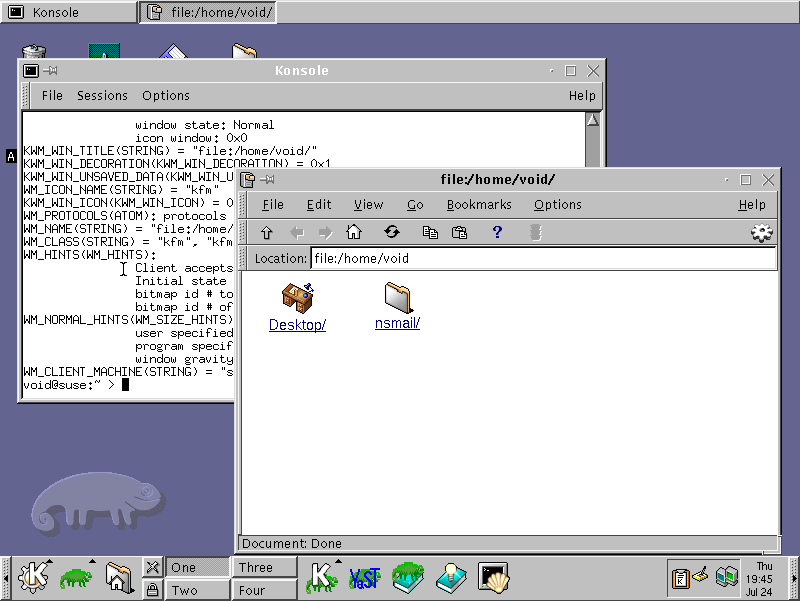
@lyse@lyse.isobeef.org True, at least old versions of KDE had icons:
GNOME, on the other hand, didn’t, at least to my old screenshots from 2007:
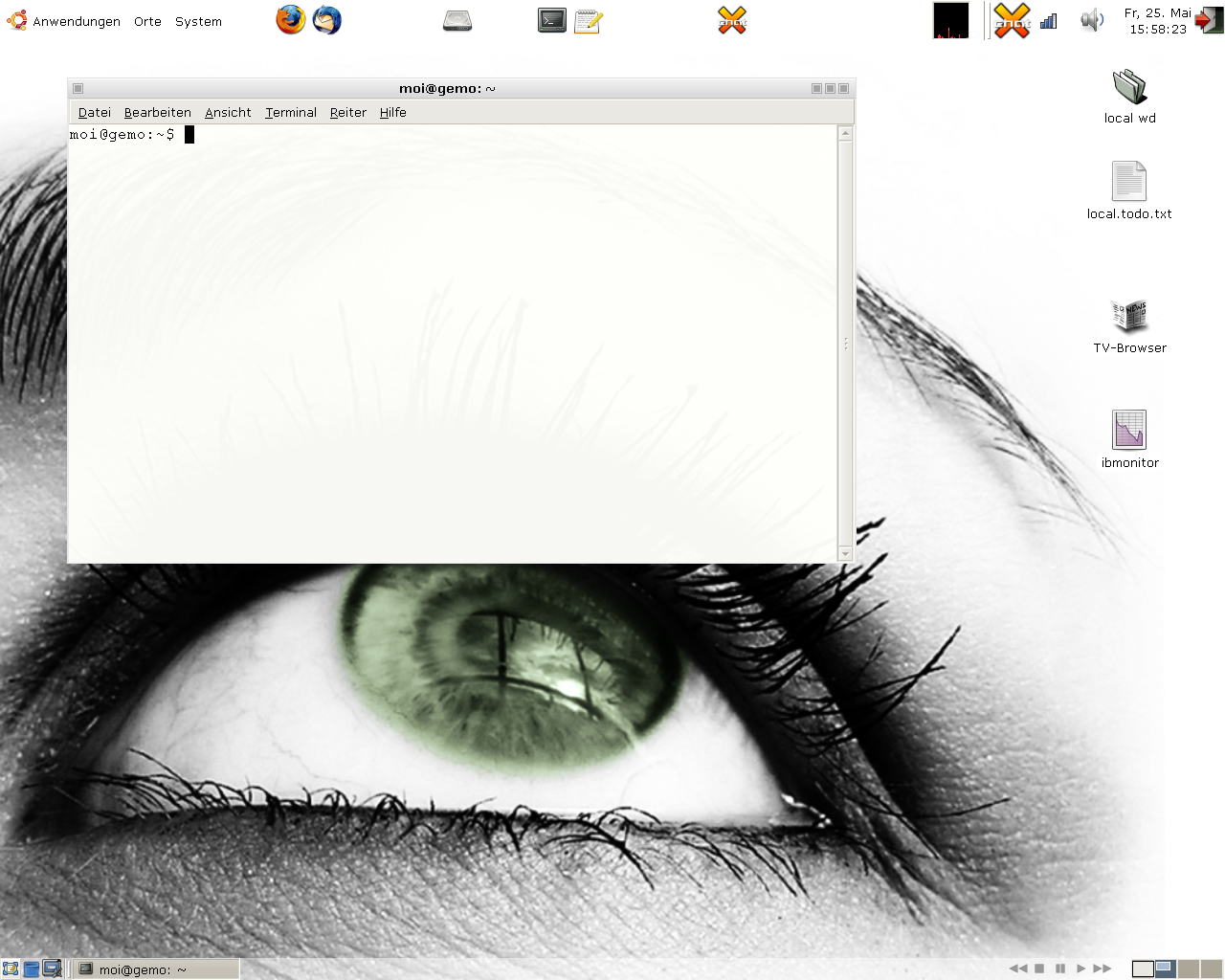
I switched to Linux in 2007 and no window manager I used since then had icons, apparently. Crazy. An icon-less existence for 18 years. (But yeah, everything is keyboard-driven here as well and there are no buttons here, either.)
Anyway, my draft is making progress:
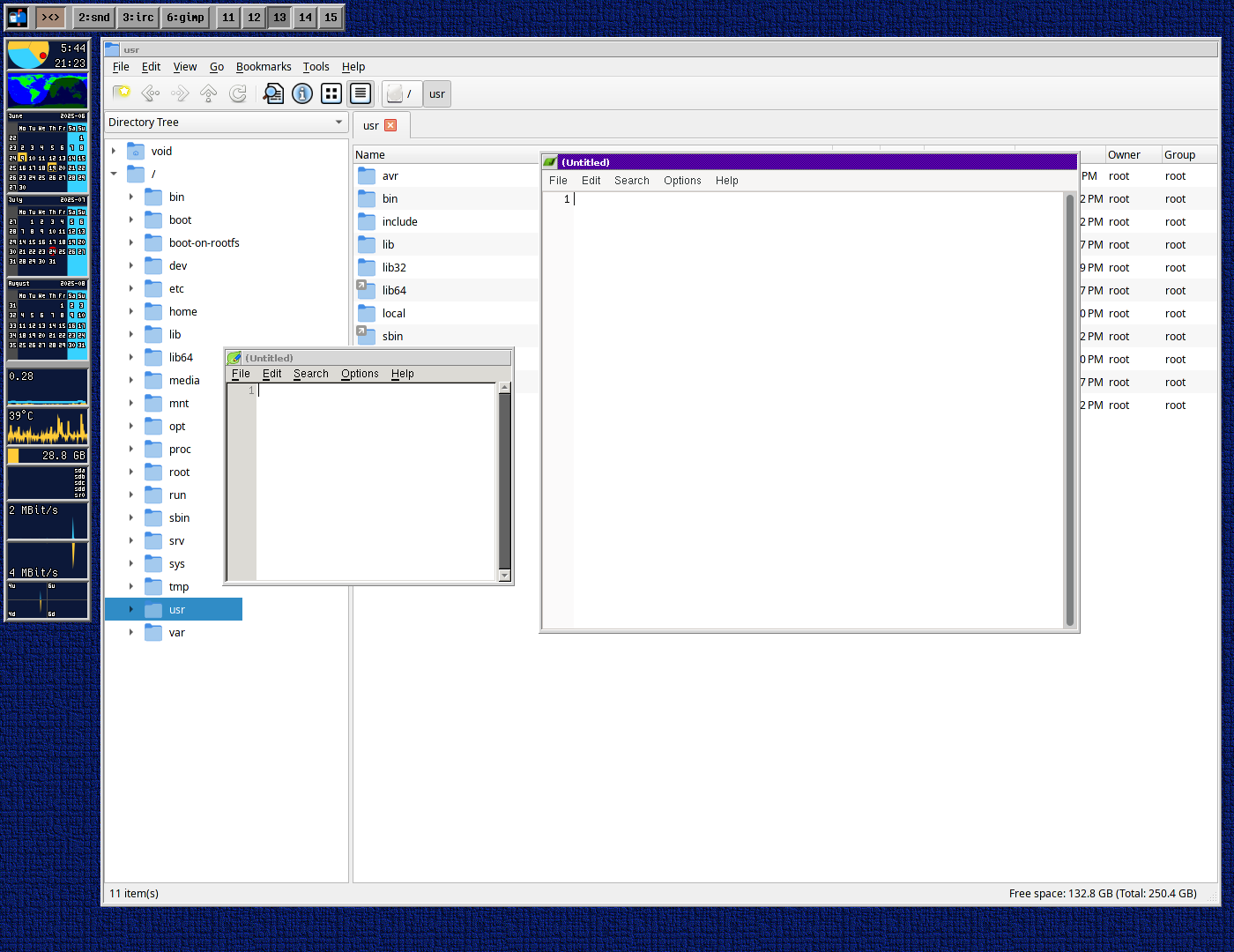
I do like this look. 😊
Only figured this out yesterday:
pinentry, which is used to safely enter a password on Linux, has several frontends. There’s a GTK one, a Qt one, even an ncurses one, and so on.
GnuPG also uses pinentry. And you can configure your frontend of choice here in gpg-agent.conf.
But what happens when you don’t configure it? What’s the default?
Turns out, pinentry is a shellscript wrapper and it’s not even that long. Here it is in full:
#!/bin/bash

# Run user-defined and site-defined pre-exec hooks.
[[ -r "${XDG_CONFIG_HOME:-$HOME/.config}"/pinentry/preexec ]] && \
        . "${XDG_CONFIG_HOME:-$HOME/.config}"/pinentry/preexec
[[ -r /etc/pinentry/preexec ]] && . /etc/pinentry/preexec

# Guess preferred backend based on environment.
backends=(curses tty)
if [[ -n "$DISPLAY" || -n "$WAYLAND_DISPLAY" ]]; then
        case "$XDG_CURRENT_DESKTOP" in
        KDE|LXQT|LXQt)
                backends=(qt qt5 gnome3 gtk curses tty)
                ;;
        *)
                backends=(gnome3 gtk qt qt5 curses tty)
                ;;
        esac
fi

for backend in "${backends[@]}"
do
        lddout=$(ldd "/usr/bin/pinentry-$backend" 2>/dev/null) || continue
        [[ "$lddout" == *'not found'* ]] && continue
        exec "/usr/bin/pinentry-$backend" "$@"
done

exit 1
Preexec, okay, then some auto-detection to use a toolkit matching your desktop environment …
… and then it invokes ldd? To find out if all the required libraries are installed for the auto-detected frontend?
Oof. I was sitting here wondering why it would use pinentry-gtk on one machine and pinentry-gnome3 on another, when both machines had the exact same configs. Yeah, but different libraries were installed. One machine was missing gcr, which is needed for pinentry-gnome3, so that machine (and that one alone) spawned pinentry-gtk …
↳
In-reply-to
»
HTTP referrers are quite broken, aren’t they?
⤋ Read More
@lyse@lyse.isobeef.org Hm, I don’t think so, the requested page was a Linux-specific post. 🤔 I sometimes wonder if privacy-oriented browsers might do this on purpose, to create garbage data? 🤔 No idea.
This is it, boys and girls! The year of the Linux Desktop is this! I can smell it! :-D
For the first time, Linux has officially broken the 5% desktop market share barrier in the United States of America! It’s a huge milestone for open-source and our fantastic Linux community.
Linux Hardening Guide https://madaidans-insecurities.github.io/guides/linux-hardening.html
How to Set Up Alpine Linux as a Desktop OS https://cleberg.net/blog/alpine-desktop.html
PSA: setpriv on Linux supports Landlock.
If this twt goes through, then restricting the filesystem so that jenny can only write to ~/Mail/twt, ~/www/twtxt.txt, ~/.jenny-cache, and /tmp works.
Try again. RR fixed for Linux core browser systems…
The Linux installation on my main PC turned 14 today:
$ head -n 1 /var/log/pacman.log
[2011-07-07 11:19] installed filesystem (2011.04-1)
↳
In-reply-to
»
I bought the “remastered” versions of Grim Fandango and Forsaken on GOG, because they’re super cheap at the moment. Both have native Linux versions.
⤋ Read More
@eldersnake@we.loveprivacy.club This wasn’t always the case, though. Quake3, Quake4, Unreal Tournament 99 and 2004 are examples of games that used to run very well as native Linux games. But that was 20+ years ago …
↳
In-reply-to
»
I bought the “remastered” versions of Grim Fandango and Forsaken on GOG, because they’re super cheap at the moment. Both have native Linux versions.
⤋ Read More
@movq@www.uninformativ.de reminds me how many Windows games using Proton (or WINE with similar patches) on Linux run better than some of the old native Linux binaries.
It looks like I missed a lot. My Pinephone is ideal for Gopher browsing because Firefox runs like a slug. Need more ARM Linux browsers.
↳
In-reply-to
»
I bought the “remastered” versions of Grim Fandango and Forsaken on GOG, because they’re super cheap at the moment. Both have native Linux versions.
⤋ Read More
In all fairness, GOG says that Forsaken is only supported on Ubuntu 16.04 – not current Arch Linux. If you ask me, this just goes to show that Linux is not a good platform for proprietary binary software.
Is it free software, do you have the source code? Then you’re good to go, things can be patched/updated (that can still be a lot of work). But proprietary binary blobs? Very bad idea.
I bought the “remastered” versions of Grim Fandango and Forsaken on GOG, because they’re super cheap at the moment. Both have native Linux versions.
And both these Linux version crap their pants. 🫤 The bundled SDL2 of Forsaken says it “can’t find a matching GLX visual” and I couldn’t figure out how to fix that. I didn’t spend a lot of time on Grim Fandango.
Both work great in Wine. 🤦
(I do have the original version of Grim Fandango from the 1990ies, but that one does not work so well in Wine. I figured, if it’s so cheap, why not. And I now get to play the english version. 😃 The german dub is pretty damn good, actually, but I always prefer the original these days.)
Kunai: Keep an Eye on your Linux Hosts Activity https://isc.sans.edu/diary/31054
Speaking of Wine, Arch Linux completely fucked up Wine for me with the latest update.
- 16-bit support is gone.
- Performance of 3D games is horrible and unplayable.
Arch is shipping a WoW64 build now, which is not yet ready for prime time.
And then I realized that there’s actually only one stable Wine release per year but Arch has been shipping development releases all the time. That’s quite unusual. I’m used to Arch only shipping stable packages … huh.
Hopefully things will improve again. I’m not eager to build Wine from source. I’d rather ditch it and resort to my real Windows XP box for the little (retro)gaming that I do … 🫤
update on tux racer: ofc it doesn’t run on modern linux LMFAOOOOOOO i’m installing red hat in a VM right now
OpenBSD has the wonderful pledge() and unveil() syscalls:
https://www.youtube.com/watch?v=bXO6nelFt-E
Not only are they super useful (the program itself can drop privileges – like, it can initialize itself, read some files, whatever, and then tell the kernel that it will never do anything like that again; if it does, e.g. by being exploited through a bug, it gets killed by the kernel), but they are also extremely easy to use.
Imagine a server program with a connected socket in file descriptor 0. Before reading any data from the client, the program can do this:
unveil("/var/www/whatever", "r");
unveil(NULL, NULL);
pledge("stdio rpath", NULL);
Done. It’s now limited to reading files from that directory, communicating with the existing socket, stuff like that. But it cannot ever read any other files or exec() into something else.
I can’t wait for the day when we have something like this on Linux. There have been some attempts, but it’s not that easy. And it’s certainly not mainstream, yet.
I need to have a closer look at Linux’s Landlock soon (“soon”), but this is considerably more complicated than pledge()/unveil():
so they will be here with me, idk, i feel insecure when other people watch me using linux, its weird, even more when I use a WM like Bspwm
so they will be here with me, idk, i feel insecure when other people watch me using linux, its weird, even more when I use a WM like Bspwm
↳
In-reply-to
»
I had a lot of fun with my modems these past few days:
⤋ Read More
SuSE Linux 6.4 and Arachne on DOS also work (with Windows 2000 as a call target):
I have Espanso running on linux, windows and android now.
Android is a brunch of linux. You only need to install a terminal app. But the termux app on Google Apps will not run on old android. Perhaps connectbot (ssh client) will run.
↳
In-reply-to
»
@lyse Nope, this is some random photo. 😅
⤋ Read More
@movq@www.uninformativ.de you need to get a gold chain and hang this little penguin on it, so that nobody can doubt your Linux user status.

Hello from my SCHI535, a Samsung Galaxy S3 running Android Kitkat. I want to put Linux on this thing.
OH MY FUCKING GOD I’M GOING TO CRY I NEED BIG TUX SO BAD https://www.steiner-plueschshop.de/kuscheltiere/arktis-seetiere/pinguin-linux/
@dev1ls@texto-plano.xyz Ayer lo estuve probando en Windows y Linux, me gustó mucho, ya lo dejé como mi DNS en mi PC y en el trabajo también
hereby i invite anyone who wants to use the old computer to move away from microsoft and run linux instead, if you need an assistnace to install and configure linux on your old - perfecly good computer and make it fast and secure again