↳
In-reply-to
»
I’m seeing some slowdowns in Vim lately. Must have something to do with syntax highlighting or indentation rules or something: When I hit Enter to go to the next line, it sometimes freezes for like 100 ms. It’s pretty annoying.
⤋ Read More
@movq@www.uninformativ.de Interesting, given that Vim Classic is specifically an AI-free fork of Vim.
I’m seeing some slowdowns in Vim lately. Must have something to do with syntax highlighting or indentation rules or something: When I hit Enter to go to the next line, it sometimes freezes for like 100 ms. It’s pretty annoying.
Doesn’t happen in Vim Classic, so I switched all my machines to that now.
↳
In-reply-to
»
@lyse Ahh yes, but
⤋ Read More
tt has a "draft" mode right? You didn't publish, then edit over and over did you? 😅
@prologic@twtxt.net Not sure if this really counts as a draft mode or this is what you had in mind. I just was in the editor for ages and didn’t close it. tt provides an integrated preview for the rendered message in there. It automatically updates every second.
Here’s a screenshot of the compose view with the conversation context on the top to which to reply to, the editor in the middle and the almost-live preview at the bottom, I hope it’s big enough: 
But it’s not like I hit the “Add message” button in the compose view (the one currently selected on the screenshot), see the message in the conversation tree and then come back into the compose view to continue editing. There’s no edit functionality in tt. Once the message is appended to my twtxt.txt file on disk, all I can do is edit it with vim. The U+2028 line breaks are really annoying to deal with (I’m sure I could do something about that if I spent the time), so I try to avoid that at all costs.
Once new messages have been added to my local file, I then manually upload the file to my server in a separate terminal. There’s no upload command integrated into tt. Right from my very first message in the beginning, I’ve always done it exactly like that. I’m used to this and it really doesn’t bother me. But I can see that others might not be fans of that at all. I might add an upload mechanism to tt at some point in the future.
Hurray, I can now press gg instead of g to go to the top in tt. Much better! :-) Other multi-key combinations are also easily possible now.
I should probably write a real article about this at some point, but here we go. The only downside with my new key binding system is that it breaks tview’s established pattern. You’ve got an InputHandler(), that is implemented using WrapInputHandler(…). It typically then directly implements the switching logic depending on the key press. Something like this:
func (w *Widget) InputHandler() func(event *tcell.EventKey, setFocus func(p tview.Primitive)) {
    // WrapInputHandler allows for intercepting key events with SetInputCapture(…)
    // from the outside for customization. This handles the default key bindings.
    return t.WrapInputHandler(func(event *tcell.EventKey, setFocus func(p tview.Primitive)) {
        switch event.Key() {
        case tcell.KeyRune:
            if event.Modifiers() == tcell.ModNone {
                switch event.Rune() {
                case 'k':
                    w.scrollUp()
                    return // we already handled the event, stop processing

                case 'j':
                    w.scrollDown()
                    return
                }
            }
        }

        // We didn't handle the key event. Maybe the parent
        // widget knows what to do with it.
        if handler := w.parent.InputHandler(); handler != nil {
            handler(event, setFocus)
        }
    })
}
From the outside, you can intercept and either stop or continue the widget’s original key handling with a potentially rewritten key event using SetInputCapture(…):
w := NewWidget()
// customized or additional key bindings
w.SetInputCapture(func(event *tcell.EventKey) *tcell.EventKey {
    switch event.Key() {
    case tcell.KeyUp:
        // Rewrite the event, so the "cursor up" key is an alias
        // for the vim key binding "k", that is handled by the
        // wrapped input handler above. (I know, I know, this is a
        // completely unrealistic example, why would anyone use
        // cursor keys when there are vim key bindings available?!)
        return tcell.NewEventKey(tcell.KeyRune, 'k', tcell.ModNone)

    case tcell.KeyRune:
        if event.Modifiers() == tcell.ModNone {
            switch event.Rune() {
                case 'q':
                    app.Stop()
                    // we already handled the event, do not pass it
                    // to the wrapped input handler above
                    return nil

                case 'r':
                    toggleMessageReadStatus()
                    return nil
            }
        }
    }

    // we didn't handle the event, pass it to the wrapped
    // input handler above
    return event
}
Since they all expect a single key, I’ve noticed that using multiple dedicated KeyBindings of mine on these different levels kinda breaks multi-key handling with common prefixes. The outer-most KeyBinding captures the prefix, but it can’t transfer it to the inner one if not handled by the outer one. At least not without some more (potentially ugly) changes. So, I now have to work with just a single KeyBindings object for the entire widget chain (if it consists of multiple other widgets or the regular input handler and input capture are in the game). The outside needs to register all its key bind customizations or extensions at the same level that the original widget handles its default ones. Doable by exposing the widget’s KeyBindings instance, but not pretty. You always have to keep this in mind.
With the KeyBindings, it will look like that:
type Widget struct {
    parent tview.Primitive

    // make it available to children or the outside either by
    // direct field access or by providing a getter method
    KeyBindings *bind.KeyBindings
}

func NewWidget() *Widget {
    w := &Widget{KeyBindings: &bind.KeyBindings{}}
    w.KeyBindings. // default key bindings
        Bind0(bind.KeySequence('k', w.scrollUp).
        Bind0(bind.KeySequence('j', w.scrollDown)
    return w
}

func (w *Widget) InputHandler() InputHandler() func(event *tcell.EventKey, setFocus func(p tview.Primitive)) {
    return t.WrapInputHandler(func(event *tcell.EventKey, setFocus func(p tview.Primitive)) {
        // also note the missing support for focus transfer at the moment
        event = w.KeyBindings.Capture(event)
        if event == nil {
            return
        }

        if handler := w.parent.InputHandler(); handler != nil {
            handler(event, setFocus)
        }
    }
}
And then from the outside, or in a child widget:
w := NewWidget()
w.KeyBindings. // additional or customized key bindings
    Bind1(bind.KeySequence(tcell.KeyUp), func(*tcell.EventKey) *tcell.EventKey {
        return tcell.NewEventKey(tcell.KeyRune, 'k', tcell.ModNone)
    }).
    Bind0(bind.KeySequence('q'), app.Stop).
    Bind0(bind.KeySequence('r'), toggleMessageReadStatus)
When directly working with tview primitives that are not part of custom widget implementations, the following works well so far:
textView := tview.NewTextView().
    SetWordWrap(true).
    SetText("…")
    SetScrollable(true)
textView.SetInputCapture((&bind.KeyBindings{}).
    Bind0(bind.KeySequence('q'), app.Stop).
    Bind1(bind.KeySequence('g', 'g'), func(*tcell.EventKey) *tcell.EventKey {
        return tcell.NewEventKey(tcell.KeyHome, 0, tcell.ModNone)
    }).
    Capture)
I need to sleep on this some more.
Also, writing very long messages like this one is really not all that fun in tt’s editor. I should absolutely provide a way to shell out to vim.
(Took me about one and a half hours to compose, holy crap. But not only because of not using vim. Although, that might have saved me a quarter hour or so for sure. Proof-reading this message also uncovered quite a few bugs in my real documentation. So, that’s a big win!) Good night!
↳
In-reply-to
»
The original twt is unavailable. It may have been edited or deleted, or is from an unknown or muted feed.
⤋ Read More
@david@daiwei.me Ta, I continued my fun with studying the tcell and cbind code bases for key bindings. My plan is to eventually not only support custom key bindings in the tt configuration file, but also to enable multi-key sequences, such as gg to jump to the top of a list/tree. Or use other vim-like navigation movements like 7j or 25gg etc.
And it turns out there are only a hand full oft tcell/cbind version combinations that work together. Only if all stars align, there’s chance of success. I will probably end up pulling cbind in to simplify my life. There are situations where tcell.EventKey’s triple of key, modifiers and rune are not all that intuitive to me. Let’s see.
↳
In-reply-to
»
Speaking of vim... Which version of vim should I ship with GoNIX? 🤔 Vim or Neovim or something else?
⤋ Read More
@prologic@twtxt.net gonix-vim, of course. 😅
↳
In-reply-to
»
Speaking of vim... Which version of vim should I ship with GoNIX? 🤔 Vim or Neovim or something else?
⤋ Read More
@prologic@twtxt.net Depends on what you want, I guess.
Stability: vim-classic > vim > neovim
Features: neovim > vim > vim-classic
😅
Speaking of vim… Which version of vim should I ship with GoNIX? 🤔 Vim or Neovim or something else?
Other than the few Unicode issues I mentioned recently, vim-classic works just fine. I completely forgot that I switched to it.
I noticed that there are quite a few UI glitches in vim-classic – and quickly found the cause: It comes with outdated Unicode tables.
I have to admit that I wasn’t aware that there’s a new Unicode release every year:
https://en.wikipedia.org/wiki/Unicode#Versions
Look at this huge number of changes. Every program has to keep track of that, often through libraries but sometimes not (like in Vim’s case).
I use Unicode extensively, but this shit is extremely expensive …
My TUI framework is having the same problem. At the moment, this is all offloaded to wcwidth, but if that library was to become unmaintained, I’d have to track Unicode myself.
Gah!
The DOS days were simpler. CP437, end of story. (Yes, I know that’s a lie.)
↳
In-reply-to
»
And another fork: https://drewdevault.com/2026/03/25/2026-03-25-Forking-vim.html
⤋ Read More
Giving vim-classic a try now. Let’s see how it goes. 🤔
↳
In-reply-to
»
Every now and then, I think that I have carefully proof-read my message enough times and hit the "Add message" button in
⤋ Read More
tt. But then, in the message tree, I spot another missed typo. My process is then to go to my twtxt.txt and fix it by hand. However, I still have to clean up tt's cache. This is rather tidious:
Getting the vim key bindings to work for focus switching in this modal dialog took me forever. Only cursors and (Shift+)Tab are supported out of the box. I absolutely understand that, it’s fine. I installed an input handler on the dialog, but the focus always stayed the same.
After two wasted hours, I was in despair to copy the tview.Modal into my own code base. Of course, I had to fix all the private tview field accesses first. But even installing the input handler directly on the buttons themselves did not work. Even though, the handler was definitely executed, the focus did not shift. Forcing redraws as a last resort also did not work.
Looking through all the messy chained input handling, I eventually stumbled across another place in the tview.Form, which is internally used by tview.Modal. This messed around with app focus receptions and input handlers. This gave me the idea to make the tview.Application refocus my modal dialog after I told the modal dialog which button to select. And would you look at that, this did the trick! I haven’t completely figured out what is going on exactly, but I could get rid of my Modal clone again.
I always go through hell with focus handling in tview. Each and every time. It just does not feel natural to me. Complete brainfuck to wrap my head around. The Urwid API felt sooo much more refined, it never was an issue. It just works. In fact, I cannot think of any other TUI library that has remotely the same pain level when it comes to focusing widgets as tview.
Now I’m curious how movwin deals with that. ;-)
↳
In-reply-to
»
@lyse By the way, which site generator are you using? I kind of miss having code blocks with syntax highlighting and that generic yellow highlighting thing is pretty cool, too.
⤋ Read More
@lyse@lyse.isobeef.org Ah, I almost thought so (that you wrote it by hand), but then I looked at the source code and saw the TOC and I was like: “Naah, probably not. I would be way too lazy to do that manually.” 😅 And indeed … ha.
Oh god, yeah, that’s a lot of <span>. 🤔 Can’t really avoid that, I guess, especially if you want to do syntax highlighting of code blocks.
You wrote your own site generator, didn’t you?
In parts. I write everything in Markdown (it’s online, even: https://movq.de/blog/postings/2026-05-29/0/POSTING-en.md), plus a few Vim shortcuts (to generate thumbnails, for example), and then python-markdown renders it: https://pypi.org/project/Markdown/ This process is wrapped in a shell script, like “re-render every page if the .md file is newer than the .html file” and that’s mostly it. And the Atom feed generator is completely custom. 🤔
↳
In-reply-to
»
@lyse By the way, which site generator are you using? I kind of miss having code blocks with syntax highlighting and that generic yellow highlighting thing is pretty cool, too.
⤋ Read More
@movq@www.uninformativ.de It’s the “Lyse types the entire HTML by hand” generator. Yes, no kidding. I write articles so rarely, that I can do that once in a while. It’s fun to some degree, but also not.
After some time, I finally recorded some Vim macros to insert <b>…</b>, <var>…</var>, <span class=s>…</span> etc. around the tokens. This helped a little bit. But I was still questioning my mental state doing it like that. I also had to fix a bunch of the end tags by hand, because the word movement wasn’t enough or the end movement went too far. Quite the annoying process for sure.
But I think the HTML looks a wee bit nicer and is maybe even semantically a little bit better than having only <span>s everywhere. I find the <span class="whatever"> just soo awfully long. Of course, I never look at the code again, but knowing, that e.g. there is a <b> and it saves so many bytes in comparison, makes me happy. It is a more elegant solution in my opinion. Not by much, but better nonetheless. It’s a matter of simplicity. Admittedly, even I can’t avoid the <span>s alltogether. Oh well. On the other hand, I’m sure that this does not make any difference whatsoever. I bet, nobody and nothing, like a screenreader, analyzes the HTML for that, where this would be truly useful.
Oh! Maybe text browsers, though. It just occurred to me while composing this reply. :-) Haha, I lost my bet quickly. w3m picks up at least the <b> for keywords and builtin types, <u> for filenames and <i> for comments. Yey. No different styles for <var> and <mark>, unfortunately. elinks only renders the bold. It’s cool that I had the right intuition right from the beginning, despite being unable to pinpoint it. :-)
All the <span> hell with common syntax highlighters is a downer for me that keeps me from looking more into them. If I wrote more articles, I might rig something up with Pygments. At least that’s somehow positively connotated in my brain. Not sure if it actually deserves it, but I dealt with that in some loose form (can’t even remember) years and years ago. Apparently, it wasn’t too terrible.
To prepare the table of contents, I used grep and sed with some manual intervention in the end. The entire process can be improved. Absolutely.
You wrote your own site generator, didn’t you?
↳
In-reply-to
»
The original twt is unavailable. It may have been edited or deleted, or is from an unknown or muted feed.
⤋ Read More
@tftp@tilde.town mentioning in here requires he whole shebang. With jenny, if using vim, there is a key combination:
Nick name completions: Allows you to use ^X ^U to turn verbatim nick names into full twtxt mentions. For example, typing “cath” and then pressing ^X ^U will turn “cath” into a full mention, like “@”. (This function will read the contents of your “~/.config/jenny/follow” file.)
Via https://github.com/newsboat/newsboat/issues/3220#issuecomment-4198066671 I came across this nice selection on why not to use AI: https://github.com/Vxrpenter/AIMania/blob/main/WHY.md#why
This then lead me to the slopware list: https://codeberg.org/small-hack/open-slopware
Holy shit, there’s even more than I thought. :-O In addition to Vim, the following affects me more or less daily (but hopefully not my ancient versions): curl, VLC, ImageMagick, rsync, Python, systemd and even the Linux Kernel itself. Oh fuck me dead. :‘-(
↳
In-reply-to
»
And another fork: https://drewdevault.com/2026/03/25/2026-03-25-Forking-vim.html
⤋ Read More
@movq@www.uninformativ.de that’s it, fork it!. I am forking vim. :-D
↳
In-reply-to
»
The original twt is unavailable. It may have been edited or deleted, or is from an unknown or muted feed.
⤋ Read More
And another fork: https://drewdevault.com/2026/03/25/2026-03-25-Forking-vim.html
↳
In-reply-to
»
The original twt is unavailable. It may have been edited or deleted, or is from an unknown or muted feed.
⤋ Read More
@movq@www.uninformativ.de Luckily, I’ve never encountered any bugs in Vim with my type of work and features I use.
H… Ho… How have I not heard about vim-tagbar before? 😳
Godbolt’s Compiler Explorer support for Vim-like editing is amazing. Sometimes I almost forget that I’m using a website.
All my newly added test cases failed, that movq thankfully provided in https://git.mills.io/yarnsocial/twtxt.dev/pulls/28#issuecomment-20801 for the draft of the twt hash v2 extension. The first error was easy to see in the diff. The hashes were way too long. You’ve already guessed it, I had cut the hash from the twelfth character towards the end instead of taking the first twelve characters: hash[12:] instead of hash[:12].
After fixing this rookie mistake, the tests still all failed. Hmmm. Did I still cut the wrong twelve characters? :-? I even checked the Go reference implementation in the document itself. But it read basically the same as mine. Strange, what the heck is going on here?
Turns out that my vim replacements to transform the Python code into Go code butchered all the URLs. ;-) The order of operations matters. I first replaced the equals with colons for the subtest struct fields and then wanted to transform the RFC 3339 timestamp strings to time.Date(…) calls. So, I replaced the colons in the time with commas and spaces. Hence, my URLs then also all read https, //example.com/twtxt.txt.
But that was it. All test green. \o/
En cas d’oubli de sudo dans vim :w !sudo tee %
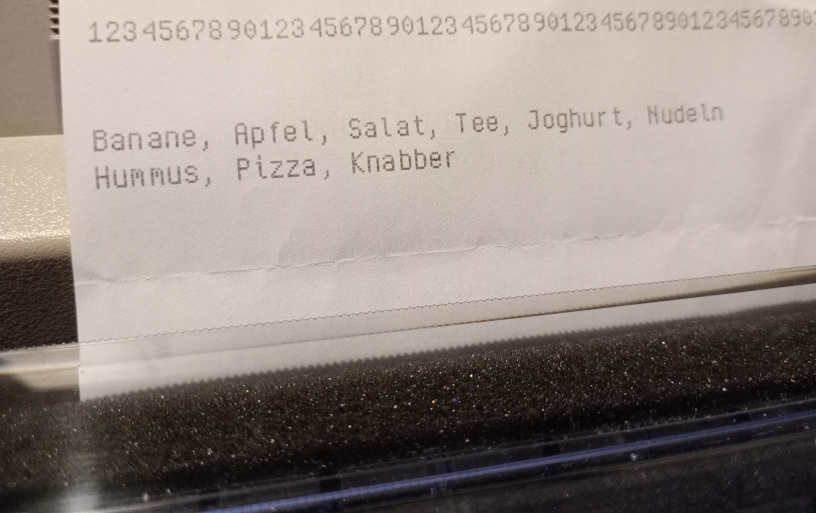
Android shopping list apps disappointed me too many times, so I went back to writing these lists by hand a while ago.
Here’s what’s more fun: Write them in Vim and then print them on the dotmatrix printer. 🥳
And, because I can, I use my own font for that, i.e. ImageMagick renders an image file and then a little tool converts that to ESC/P so I can dump it to /dev/usb/lp0.
(I have so much scrap paper from mail spam lying around that I don’t feel too bad about this. All these sheets would go straight to the bin otherwise.)
↳
In-reply-to
»
@aelaraji tell us all about it, without omitting details!
⤋ Read More
@aelaraji@aelaraji.com Nice! :-) Since vim is quite advanced cavemanery, you could probably even remap Enter when editing the twtxt.txt.
↳
In-reply-to
»
@aelaraji tell us all about it, without omitting details!
⤋ Read More
Just typing twts directly into my twtxt file.
Details:
- Opening my twtxt file remotely using
vim scp://user@remote:port//path/to/twtxt.txt
- Inserting the date, time and tab part of the twt with
:.!echo "$(date -Is)\t"
- In case I need to add a new line I just
Ctrl+Shift+u, type in the2028and hitEnter
- In order to replay, you just steal a twt hash from your favorite Yarn instance.
It looks tedious, but it’s fun to know I can twt no matter where I am, as long as can ssh in.
@movq@www.uninformativ.de streamlining jenny.vim?
index adc0db9..cb54abc 100644
--- a/vim/ftdetect/jenny.vim
+++ b/vim/ftdetect/jenny.vim
@@ -1 +1,2 @@
 au BufNewFile,BufRead jenny-posting.eml setl completefunc=jenny#CompleteMentions fo-=t wrap
+au BufRead,BufNewFile jenny-posting.eml normal $
Sin terminar de adaptarme al teclado Dvorak ya me siento tentado por el Colemak. Antes, al menos, tengo que fluir mejor en VIm.
Something happened with the frame rate of terminal emulators lately. It looks like there’s a trend to run at a high framerate now? I’m not sure exactly. This can be seen in VTE-based terminals like my xiate or XTerm on Wayland. foot and st, on the other hand, are fine.
My shell prompt and cursor look like this:
$ █
When I keep Enter pressed, I expect to see several lines like so:
$
$
$
$
$
$
$ █
With the affected terminal emulators, the lines actually show up in the following sequence. First, we have the original line:
$
█
Pressing Enter yields this as the next frame:
$
█
And then eventually this:
$
$ █
In other words, you can see the cursor jumping around very quickly, all the time.
Another example: Vim actually shows which key you just pressed in the bottom right corner. Keeping j pressed to scroll through a file means I get to see a j flashing rapidly now.
(I have no idea yet, why exactly XTerm in X11 is fine but flickering in Wayland.)
#vim pour incrémenter un nombre (numéro de section) ctrl-a
I probably should implement some editing feature in tt. Sure, I can easily edit my feed in vim to fix typos. But then I still have to manually remove the old message from the cache so that the new message is inserted on next reload and I don’t end up with “duplicates” in the message tree.
A Vim-like interface for Firefox https://github.com/tridactyl/tridactyl
↳
In-reply-to
»
Ha, I just learned that deleting text in my zsh with
⤋ Read More
Ctrl+U to the front or Ctrl+K to the end puts it in a buffer that can be pasted by pressing Ctrl+Y! That's neat. Even removing the last word with Ctrl+W moves it into this paste buffer.
@lyse@lyse.isobeef.org Ctrl-U in Vim does something similar (“Delete all entered characters before the cursor in the current line”), but it does not put them into the “clipboard”. I sometimes hit Ctrl-U by accident and then my text is gone. 😡😂
Generating Slides in Vim - https://jarbus.net/blog/generating-slides-in-vim/
↳
In-reply-to
»
Just like we don't write emails by hand anymore (See: #a3adoka), we don’t manually write Twts or update our
⤋ Read More
twtxt.txt feeds. Instead, we use modern Twtxt clients that conform to the specifications at Twtxt.dev for a seamless, automated experience. #Twtxt #Twt #UserExperience
@prologic@twtxt.net Phew, I’m indeed not twtxt.dev, because I sometimes actually do edit my feed with vim like a barbarian.
Is there a way to auto-insert a time stamp on vi or vim at the beginning of each line? Like, upon opening like so:
2025-03-20 15:04:03 Blah blah blah blah
2025-03-20 15:04:15 Bleh bleh bleh bleh
2025-03-20 15:04:22 ...
A Vim Guide for Advanced Users https://thevaluable.dev/vim-advanced/
↳
In-reply-to
»
I'm in an article in Quanta Magazine! It's about the bizarre world of algorithms that re-use memory that's already full. https://www.quantamagazine.org/catalytic-computing-taps-the-full-power-of-a-full-hard-drive-20250218/ I'm the one with all the snow in the background.
⤋ Read More
@falsifian@www.falsifian.org Neat, I got the principle, so mission accomplished. :-)
I have configured my vim to use a tab width of four. So, I noticed that especially https://www.falsifian.org/blog/2021/06/04/catalytic/reachability_with_stack.cc (but also partially the other C++ file) mixes tabs and spaces for indentation. :-)
I’m refactoring (mangling four lines of of code with assignments into one function call) and man, do I love vim macros! Such a bloody amazing invention. Saves me heaps of manual labor.
↳
In-reply-to
»
And that was the first time Vim ever crashed on me:
⤋ Read More
@movq@www.uninformativ.de Well, congrats, I guess! :-D I never had Vim crash on me, they do a killer job on keeping it stable.
And that was the first time Vim ever crashed on me:
Vim: Caught deadly signal SEGV
Vim: preserving files...
Vim: Finished.
Segmentation fault (core dumped)
I was using Ctrl+P to scroll through the completion list. 🤔 Reproducible. Ctrl+N still works.
Hopefully fixed by this: https://github.com/vim/vim/commit/8d0bb6dc9f2e5d94ebb59671d592c1b7fa325ca6
↳
In-reply-to
»
ROFL 🤣 I've found myself a new insult:
⤋ Read More
:diffoff a vim command...
@prologic@twtxt.net it offends someone with a different opinion? 🤣
No, seriously… :diffoff is used to disable vim’s diff mode that’s usually started running vim -d someFile someOtherFile or by having both files on a split window and applying :diffthis on both panes. (just learned this this morning)
ROFL 🤣 I’ve found myself a new insult: :diffoff a vim command…
↳
In-reply-to
»
LMAO! 🤣 I've had @doesnm's nick linked to @prologic's url for this feed the whole time !! 🤦
⤋ Read More
@lyse@lyse.isobeef.org Nah, that’s definitely my sleep deprivation … I should stop effing with vim when I’m sleepy 😅
a new emmanation of my trusty old vim config, now available as a home-manager nix module. now i can track my dependencies with nix instead of using git subtree and it makes installing backend programs like language servers and such way easier. https://src.ix.cyb.red/pe-vim/
I think it’s time I set up jenny for this feed… been echo-ing my twits manually and there came times when it made me feel like a dork xD Plus I don’t have my vim’s :set spell to catch up with the typos
↳
In-reply-to
»
Learned to
⤋ Read More
gg=G and to va", ci", di{... in vim the other day 😆 Life will never be the same, I can feel it. ref
@lyse@lyse.isobeef.org yeah, that’s the thing! I’ve been trying to learn more vim motions and I just can’t get myself to remember any… Now I have that cheat sheet bookmarked, I can look them up on the need to know basis.
Learned to gg=G and to va", ci", di{… in vim the other day 😆 Life will never be the same, I can feel it. ref